
Drive a robot car from your phone! In this project a HC-05 Bluetooth module receives commands from an Android app and your Arduino steers the motors — forward, back, left, right. It’s one of the most fun beginner robotics builds.
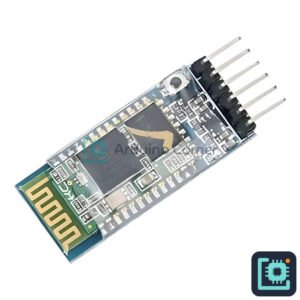
What you’ll need
- Arduino Uno R3 — runs the car
- HC-05 Bluetooth Module — receives commands from your phone
- Smart Car Chassis Kit — frame, motors and wheels
- L298N Motor Driver — drives the motors
- 18650 Battery Holder — powers the car
How it works
An Arduino Bluetooth controller app sends a single letter for each button — for example F for forward or L for left. The HC-05 passes that letter to the Arduino over serial, and the code drives the L298N motor driver to move the car.
Wiring
- HC-05 TX → Arduino RX (D0), RX → Arduino TX (D1) (unplug during upload), VCC→5V, GND→GND.
- L298N IN1→D8, IN2→D9, IN3→D10, IN4→D11; battery → L298N 12V; L298N 5V → Arduino.
The Arduino code
char cmd;
int IN1=8,IN2=9,IN3=10,IN4=11;
void setup(){ Serial.begin(9600); pinMode(IN1,OUTPUT);pinMode(IN2,OUTPUT);pinMode(IN3,OUTPUT);pinMode(IN4,OUTPUT); }
void go(int a,int b,int c,int d){ digitalWrite(IN1,a);digitalWrite(IN2,b);digitalWrite(IN3,c);digitalWrite(IN4,d); }
void loop(){
  if(Serial.available()){
    cmd=Serial.read();
    if(cmd=='F') go(1,0,1,0);       // forward
    else if(cmd=='B') go(0,1,0,1);  // back
    else if(cmd=='L') go(0,0,1,0);  // left
    else if(cmd=='R') go(1,0,0,0);  // right
    else go(0,0,0,0);               // stop
  }
}
Tip: unplug the HC-05 TX/RX wires while uploading, or the upload will fail (they share the Arduino’s serial pins).
Get the parts
Everything for this build is in stock at Smart Home | Arduino Corner — Shaheen Market, DAV College Road, Rawalpindi — with cash-on-delivery across Pakistan. Grab an HC-05, a chassis kit and an L298N. Browse the store →