
Nobody wants to touch a bin lid. This one opens by itself: an HC-SR04 ultrasonic sensor on the front watches for a hand, and when something comes within range a servo lifts the lid, holds it open while you drop the rubbish in, then closes it again.
It is a hygiene project with an obvious point to it, which is exactly why examiners like it.
What you’ll need
- Arduino Uno R3 (with USB cable) — runs the code
- HC-SR04 Ultrasonic Sensor — measures the distance
- SG90 Micro Servo — lifts the lid
- Jumper Wires (M-F) — six connections
- A bin with a hinged lid, plus a lever arm to the servo horn
New to Arduino? Start with the Arduino Uno Starter Kit.
Wiring diagram
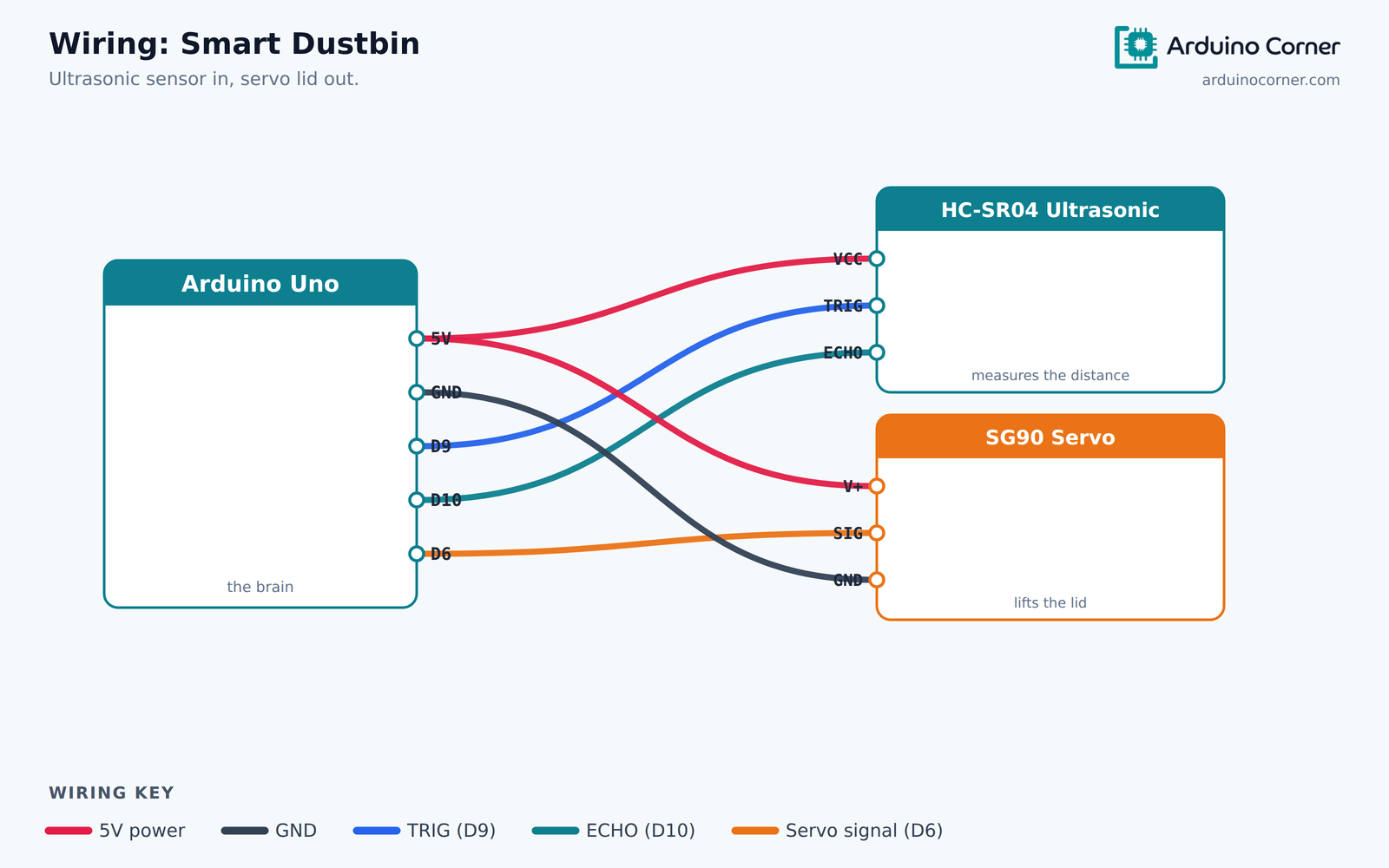
The same connections as a quick reference table:
| From (module) | To (Arduino Uno) |
|---|---|
| HC-SR04 — VCC | 5V |
| HC-SR04 — TRIG | D9 |
| HC-SR04 — ECHO | D10 |
| HC-SR04 — GND | GND |
| Servo — signal (orange) | D6 |
| Servo — V+ / GND (red/brown) | 5V / GND |
On power: a single SG90 will usually run from the Arduino’s 5V pin, but servos draw current in sharp bursts. If the board keeps resetting when the lid moves, give the servo its own 5V supply and connect the grounds together.
How it works
The HC-SR04 measures distance the way a bat does. The Arduino sends a 10-microsecond pulse to TRIG, the module emits an ultrasonic burst, and ECHO goes HIGH for exactly as long as the sound takes to travel out and back.
Sound covers about 0.034cm per microsecond, so multiplying the echo time by 0.034 gives the round-trip distance — and dividing by two gives the distance to the object. When that drops below 25cm, the servo swings the lid open.
The Arduino code
#include <Servo.h>

Servo lid;

const int trigPin  = 9;
const int echoPin  = 10;
const int servoPin = 6;

const int openDistance = 25;   // cm - how close a hand must come
const int lidClosed = 0;
const int lidOpen   = 90;

void setup() {
  pinMode(trigPin, OUTPUT);
  pinMode(echoPin, INPUT);
  lid.attach(servoPin);
  lid.write(lidClosed);
}

long readDistanceCm() {
  digitalWrite(trigPin, LOW);
  delayMicroseconds(2);
  digitalWrite(trigPin, HIGH);
  delayMicroseconds(10);
  digitalWrite(trigPin, LOW);

  long duration = pulseIn(echoPin, HIGH, 30000);   // timeout after 30 ms
  if (duration == 0) {
    return 999;                                    // nothing in range
  }
  return duration * 0.034 / 2;                     // speed of sound
}

void loop() {
  long distance = readDistanceCm();

  if (distance < openDistance) {
    lid.write(lidOpen);
    delay(3000);            // stay open while you drop the rubbish in
    lid.write(lidClosed);
  }
  delay(100);
}
Understanding the code
The timeout in pulseIn(echoPin, HIGH, 30000) is important. With no timeout, if the echo never returns — a soft surface, or nothing in range at all — the sketch would freeze waiting for it. Returning 999 instead means “nothing nearby”, and the loop carries on.
The delay(3000) is the hold-open time. Too short and the lid shuts on your hand; too long and the bin sits open. Three seconds is a reasonable starting point.
Troubleshooting
- Lid opens and closes constantly: the sensor is seeing the lid itself as it moves. Angle it slightly downward and away, or add a short delay after closing.
- Readings jump around: soft or angled surfaces scatter ultrasound. Take three readings and use the middle one.
- Arduino resets when the lid moves: the servo is browning out the board. Power it separately, grounds joined.
- Servo buzzes at rest: it is fighting the lid’s weight. Adjust the linkage or use
lid.detach()once it has closed. - Lid opens the wrong way: swap the
lidOpenandlidClosedangles.
Take it further
- Add a second ultrasonic sensor inside to measure how full the bin is.
- Add an RGB LED that turns red when the bin needs emptying.
- Send a full-bin alert over Wi-Fi with an ESP8266 — the basis of a real smart-city project.
- Use a stronger metal-gear servo for a heavier lid.
Prefer it ready-made?
The enclosure and the lid linkage take most people a weekend and a trip to a laser cutter. If you would rather skip the wiring, we sell this exact project fully assembled and mounted on a presentation board — see the Arduino Smart Dustbin Project. It is the same circuit described above, built and ready to demonstrate, which is what most students submitting a project actually need.
Frequently asked questions
What is the detection range?
The HC-SR04 reads from roughly 2cm to 4m. For a bin you only want the last 20–30cm, which is what openDistance sets.
Can I use an IR sensor instead?
Yes, and it is cheaper — but IR is easily fooled by dark or shiny surfaces, and gives you no distance reading. Ultrasonic is more reliable here.
Will one servo lift a real bin lid?
An SG90 handles a light MDF or plastic lid. For anything heavier use an MG996R metal-gear servo and a separate supply.
Can it run on batteries?
Yes. Use a battery pack that can supply the servo’s current spikes — a 6V pack or a good power bank works well.
Related project guides
Get the parts
Everything for this build is in stock at Smart Home | Arduino Corner — Shaheen Market, DAV College Road, Rawalpindi — and ships across Pakistan with cash on delivery. Grab an HC-SR04 Ultrasonic Sensor and an SG90 Micro Servo. Message us on WhatsApp and we will put the whole kit together for you.